
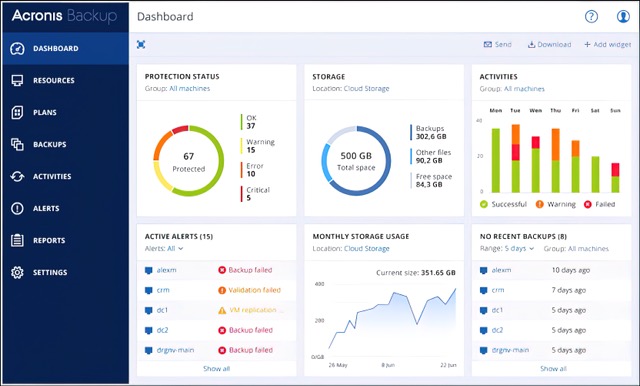
Small business owners in West Palm Beach face constant pressure to keep operations running smoothly. Data loss can interrupt daily work and create lasting setbacks. Cyber Cloud Backup with Acronis offers a straightforward way to safeguard files, invoices and customer records without adding extra tasks to an already busy schedule.
Understanding Common Data Risks for Local Businesses
Data threats do not always come from sophisticated sources. Many stem from routine events that any office can encounter. In the course of a normal week, a team might open dozens of emails, transfer files between devices and work across multiple locations. Each of these ordinary actions carries a small chance of introducing trouble. Recognizing how these risks appear in real settings helps owners prepare without overcomplicating their routines.
Ransomware as a Daily Concern
Ransomware can enter through a single email attachment or a compromised website. Once active, it can lock access to essential documents and force difficult decisions about operations. Consider a typical morning when staff review new messages while preparing for client meetings. An attachment that looks like an invoice or a delivery confirmation can trigger the problem before anyone notices. The result is that files become unusable at the moment they are needed most, such as when closing out the books at month end or preparing payroll.
Hardware Failures and Device Loss
A hard drive can stop working without warning after years of use. Laptops can be misplaced during travel between client sites in West Palm Beach. In both cases, the information stored on those devices becomes unavailable until a recovery plan is in place. A technician might be on the road with a tablet that holds the only copy of that day’s service notes. When the device fails or is left behind, the notes and any related photos or forms disappear from immediate reach. Replacing the hardware is straightforward, yet restoring the content requires prior preparation.
Accidental Deletion and Human Error
An employee may delete a folder while organizing files or overwrite an important invoice version. These mistakes happen during normal workflow and can remove weeks of work in seconds. Picture someone sorting through a shared drive at the end of a long day, intending to clean up temporary folders. A quick click in the wrong place can send active project files into the recycle bin. Without earlier copies stored separately, the team must start from scratch, often under time pressure to meet deadlines.
The Real Cost of Data Loss Beyond the Files
When records disappear, the impact extends past the missing data itself. Staff must spend time recreating invoices and customer details instead of serving clients. Appointments may need rescheduling, and ongoing projects can stall while teams search for alternatives. In West Palm Beach, Broward County and Miami-Dade, even a few days without access can affect cash flow and client trust for small and mid-size businesses. The hours spent on recovery pull attention away from revenue-generating activities and can create backlogs that take additional days to clear.
Backup Solutions Versus Simple File Synchronization
Many teams use shared folders that update across devices. While convenient for collaboration, these systems often copy changes in real time. If ransomware encrypts a file or an accidental deletion occurs, the altered version spreads to every connected location. A dedicated backup approach stores multiple versions of files over time. This allows recovery of an earlier, clean copy without carrying forward the problem. The distinction matters for businesses that handle invoices and client records daily. Owners can review options by testing how each method responds to a sample deletion or encryption event during a quiet period.
Ensuring Automatic and Reliable Protection
Manual backup routines depend on someone remembering to start the process at the end of the day. When schedules become busy, that step can be overlooked. Cyber Cloud Backup with Acronis runs on a set schedule once configured. The process continues in the background, reducing the chance that a busy week leaves data unprotected. Owners can establish the schedule during setup and then review occasional status reports to confirm everything is proceeding as expected. This removes the need to assign the task to a specific person each evening.
How Data Recovery Works in Practice
Recovery begins with identifying the needed files or folders from available versions. The service then restores them to the original location or a new device. Specific recovery times and steps depend on the setup and are confirmed with Univox Technology during implementation. The goal remains consistent: return to normal operations with minimal additional disruption. In practice, a staff member can request restoration of a single invoice or an entire folder from a previous date, allowing work to resume without recreating content from memory.
Planning for Everyday Business Continuity
Small businesses benefit from thinking about data protection as part of regular operations rather than a separate project. This includes noting which folders contain active invoices or client lists and confirming they are included in the backup scope. Staff can be reminded to avoid storing critical items only on local desktops, and owners can schedule brief quarterly checks to verify that new applications or shared drives are still covered. These habits fit naturally into existing workflows and reduce the likelihood of gaps when staff changes occur or new devices are added.
Key Questions to Ask Before Choosing a Backup Provider
West Palm Beach business owners benefit from asking clear questions during conversations with any service. How often are backups created and stored offsite? What happens if the primary location experiences a power issue or network problem? How are older versions of files kept available for recovery? Who can initiate a restore, and what support is available during the process? These points help match the service to actual business needs. Writing the answers down during the discussion creates a reference that can be shared with the team.
Simple Pricing for Comprehensive Protection
Cyber Cloud Backup with Acronis is available at a flat rate of $300/month. This structure avoids surprise fees tied to data volume or user counts. Compared with the expense of lost workdays, staff overtime and potential client delays, the monthly cost provides a predictable alternative that supports continued operations.
Frequently Asked Questions
How does Cyber Cloud Backup with Acronis handle ransomware incidents?
It keeps previous versions of files so a clean copy can be restored after an incident without paying any demands.
What types of data can be protected with this service?
Common items include invoices, customer records, spreadsheets and documents used in daily operations.
Is the backup process visible to staff during the workday?
The service operates automatically in the background once set up, so regular work continues without interruption.
Can files be recovered after an accidental deletion?
Yes, earlier versions stored in the backup allow restoration of deleted or overwritten items.
Does the service cover businesses across multiple locations?
It supports operations in West Palm Beach, Broward County and Miami-Dade through the same managed approach.
Schedule Your Demo 20 Today
Contact Univox Technology to arrange a free 20-minute demo and see how Cyber Cloud Backup with Acronis fits your West Palm Beach operations.
WhatsApp: (954) 247-4068